
 By admin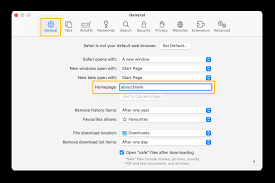
About:blank might have caught your attention if you’ve explored web browsers or noticed it as the address of a blank web page. While it might seem mysterious at first, is a completely harmless and useful feature built into modern browsers. This article dives into what is, why it exists, and how you can use it effectively.
What is “about:blank”?
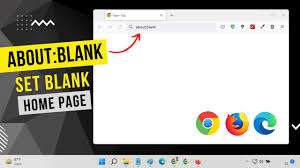
Is a special URL that displays a blank page in a web browser. The “about:” part of the URL is a built-in command used by browsers to handle internal functions, such as settings, error messages, or displaying specific system pages. When combined with “blank,” it instructs the browser to load an empty, placeholder page.
Why Does “about:blank” Exist?
The purpose of is to provide users with a clean, blank page that serves various functions. Here are some common reasons why it exists:
- Starting Point: Many users configure their browsers to open “about:blank” as their homepage. This ensures a fast-loading, distraction-free starting point.
- Placeholder for New Tabs: Some browsers use as the default page when a new tab is opened without specific content.
- Error Handling: If a browser encounters an issue loading a webpage, it might display as a fallback.
- Security Purposes: Developers and advanced users often use to isolate browser windows when running tests or troubleshooting.
How to Use “about:blank”
Understanding how “about:blank” works can help you utilize it effectively. Here are some practical uses:
Setting “about:blank” as Your Homepage
To set “about:blank” as your homepage, follow these steps:
- Open your browser settings.
- Navigate to the homepage or startup section.
- Enter “about:blank” as the desired URL.
- Save your changes.
This will ensure your browser starts with a blank page, reducing distractions and speeding up the startup process.
Using “about:blank” to Troubleshoot
When diagnosing browser issues, “about:blank” can act as a neutral test page. For example, if you suspect an extension or a website is causing problems, opening “about:blank” can help you confirm whether the issue is external.
Avoiding Unnecessary Page Loads
For users with slow internet connections, “about:blank” can be useful to prevent browsers from preloading content when opening new tabs.
Common Misconceptions About “about:blank”
Despite its simplicity, “about:blank” is often misunderstood. Here are a few clarifications:
- It’s Not a Virus: “About:blank” is a normal browser feature and not indicative of malware or hacking.
- It’s Not an Error: While it can appear when errors occur, “about:blank” itself is not an error message.
- It’s Customizable: You can use it as a personal preference for browsing convenience.
Conclusion
About:blank is a versatile and harmless feature of modern web browsers. Whether you use it to create a distraction-free environment, troubleshoot issues, or streamline your browser’s performance, it’s a tool that serves multiple purposes. By understanding its role and applications, you can make the most of this simple yet powerful feature.